
May 22, 2026
20 min read
Custom Recharge Shopify Integration: The Five Layers Brands Actually Build
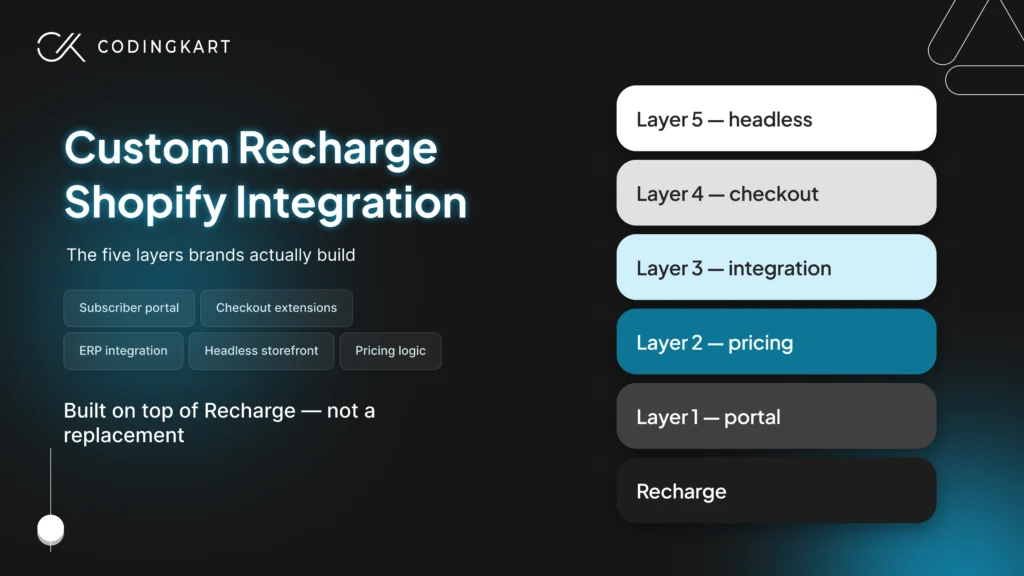
Already on Recharge and hitting a wall?
See how we build custom layers on top of Recharge for Shopify and Shopify Plus brands.
See How We HelpA custom Recharge Shopify integration means extending Recharge with custom code to handle business logic that standard app settings cannot manage. Brands build on top of Recharge rather than replacing it, adding targeted layers around pricing, fulfilment, compliance, and subscriber experience.
Most Shopify merchants set up Recharge, configure a few rules, and move on. For a while, that works. Then something in the business outgrows what any settings panel can handle. A pricing model that depends on a customer attribute Recharge has never heard of. A subscriber portal that needs to represent data structures the default portal was not built for. An operations team spending every Monday reconciling systems that should already agree.
That is the moment this is for.
What follows covers the five custom layers Shopify and Shopify Plus merchants build on top of Recharge, what each one involves, what it costs, and how to know which one your business actually needs right now.
Where Recharge Ends and Custom Development Begins
Recharge covers the subscription foundation that most Shopify merchants need. Recurring billing runs without intervention. Payment retries and dunning fire on schedule. The customer portal handles the actions subscribers take most often: skip, pause, swap, cancel, update a card. On the Recharge Pro plan, merchants also get Theme Engine access and the full Recharge API and webhooks, which is the surface custom development builds on.
That covers roughly 80% of what a subscription operation requires.
The remaining 20% is where standard configuration stops working. Not because Recharge is limited in any general sense, but because that 20% is specific to how your business prices, fulfils, validates, and presents subscriptions to its customers. No app can predict that in advance.
A pet food brand pricing renewals by dog weight. A health and wellness brand blocking signups in states with ingredient restrictions. A beauty brand managing multiple subscriber profiles under one account. A Shopify Plus merchant needing delivery window validation enforced before a subscription is created. These are not edge cases. They are the natural result of a subscription business becoming more specific about how it operates.
Custom development enters at that boundary. It does not rebuild what Recharge already handles. It adds the logic, the integrations, and the experiences that Recharge was never designed to manage, because they belong to your business specifically.
That boundary falls in one of five places. Each one maps to a distinct custom layer.
Before You Build: Theme Engine or Storefront API
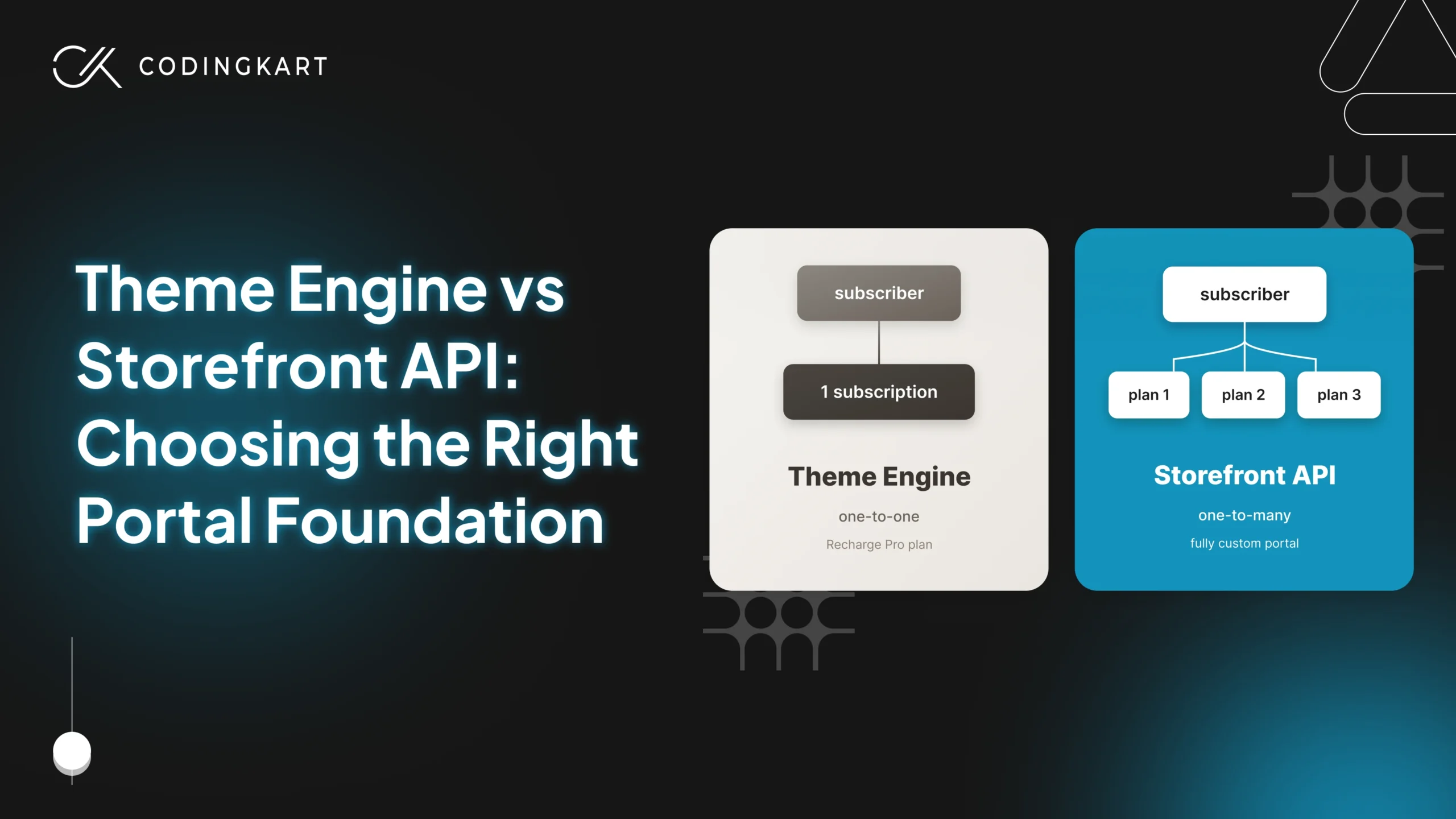
Before any custom layer gets scoped, one decision affects how Layer 1 gets built and how subscriber data flows through every layer that follows. That decision is whether your subscriber portal runs on the Recharge Theme Engine or a fully custom build using the Recharge Storefront API.
Both options sit on top of Recharge’s billing engine. The difference is what sits on top of them.
The Recharge Theme Engine is available on the Recharge Pro plan. It lets merchants customise the subscriber portal through a templating layer, using the Recharge JavaScript SDK to modify layouts, add actions, and surface additional fields. It works without rebuilding the portal from scratch and handles most branding and moderate workflow requirements well.
The Theme Engine is the right starting point when your subscriber data is one-to-one. One customer. One subscription. One set of preferences. If that describes your model, Theme Engine customisation covers most of what you need at a fraction of the cost of a fully custom build.
The Recharge Storefront API becomes the right choice the moment your subscriber data becomes one-to-many. One customer managing three pet profiles, each with its own subscription contract, diet, and renewal pricing. One company account with multiple employees managing individual preferences. One household with different product selections per member.
The Storefront API lets a custom frontend read and write subscription data directly without being constrained by the Theme Engine’s structure. Recharge still handles billing. The custom portal handles everything the subscriber sees and does.
Getting this decision right before scoping any other layer saves significant rework later. A portal built on the Theme Engine that later needs to represent one-to-many data has to be rebuilt. A portal built on the Storefront API from the start does not.
The practical test is simple. If every subscriber in your business maps to a single subscription contract with no sub-profiles beneath it, start with the Theme Engine. If any subscriber needs to manage more than one entity from a single account, start with the Storefront API.
The Five Layers of a Custom Recharge Shopify Integration
Most Shopify and Shopify Plus merchants building on top of Recharge do not need all five layers. They need one or two that address the specific gap their business has hit. The five layers below cover every area where standard Recharge configuration stops being enough, ordered from the most common starting point to the least.
Layer 1: Custom Subscriber Portal
The default Recharge portal handles the actions most subscribers take most often. It becomes a problem when your subscription model requires actions the portal was not built to surface.
Subscribers who cannot update a dog’s weight before the next renewal call support instead. Subscribers who cannot swap a meal plan without help cancel instead. Every action that should happen inside the portal but cannot cost either a support ticket or a subscriber.
What gets built:
On the Recharge Pro plan, the fastest path is Recharge Theme Engine customisation using the Recharge JavaScript SDK. This modifies the existing portal layout, adds custom fields, and surfaces additional subscriber actions without rebuilding from scratch. It is the right approach when the data model is one-to-one and the gap is branding or moderate workflow additions.
When the data model becomes one-to-many, as covered in the previous section, the build moves to a fully custom portal using the Recharge Storefront API. The portal is built to the brand’s specific requirements. Recharge continues handling billing in the background.
Common triggers across both Shopify and Shopify Plus merchants include subscribers managing multiple pets or profiles, weight or usage-based repricing that needs to surface inside the account, product configuration flows the default portal cannot represent, and subscription tier management across more than one plan.
What this layer solves:
Support tickets for actions subscribers should complete themselves. Churn driven by portal friction. Subscriber experiences that do not reflect the complexity of the product being sold.
Typical cost: $4,000 to $15,000 Typical timeline: 2 to 6 weeks
Layer 2: Custom Pricing Logic
Recharge supports fixed pricing and percentage discounts, which covers the majority of subscription models. It does not cover any model where the renewal price depends on a customer attribute that changes over time.
A dog that weighed 12 pounds at signup weighs 18 pounds six months later. The renewal price should reflect that. A supplement subscriber whose dosage has increased since their last order should not be paying the same amount they paid on day one. A meal kit subscriber who added a household member mid-subscription needs a different price on the next renewal.
Recharge has no native way to read those attributes and adjust pricing before billing runs. Without a custom pricing layer, someone on your team is making those adjustments manually before every billing cycle, or subscribers are being charged the wrong amount.
What gets built:
A custom pricing function sits between the subscriber’s current data and the Recharge billing cycle. Before each renewal runs, it reads the relevant customer attributes stored in Shopify customer metafields, calculates the correct price based on your pricing logic, and updates the subscription contract through the Recharge Subscription Contract API. The renewal then processes at the correct amount.
On Shopify Plus, Shopify Functions can extend this further. Pricing logic runs inside Shopify’s own infrastructure at checkout, which means a subscriber adjusting their plan during signup sees the correct price before they confirm, not only at renewal.
The pricing rules themselves live in a structure your operations team can update without a developer touching the code. A change to a pricing tier takes minutes, not a deployment.
What this layer solves:
Manual price adjustments before billing cycles. Subscribers being charged incorrect renewal amounts. Pricing models that depend on data Recharge cannot read or act on natively.
Typical cost: $5,000 to $20,000 Typical timeline: 2 to 6 weeks
Layer 3: ERP, 3PL, and CRM Integration
This is the layer most subscription brands need before they realise they need it.
Recharge knows what happened to every subscription. A skip, a pause, a cancellation, a product swap, an address change. What it does not do is tell your other systems. Your 3PL does not know a subscriber skipped this cycle. Your ERP does not adjust the inventory forecast. Your CRM still shows that customer as active for a fulfilment that is not happening.
Each system has a partial picture. None of them agree. And the gap between them becomes a manual reconciliation job that lands on someone’s desk every week.
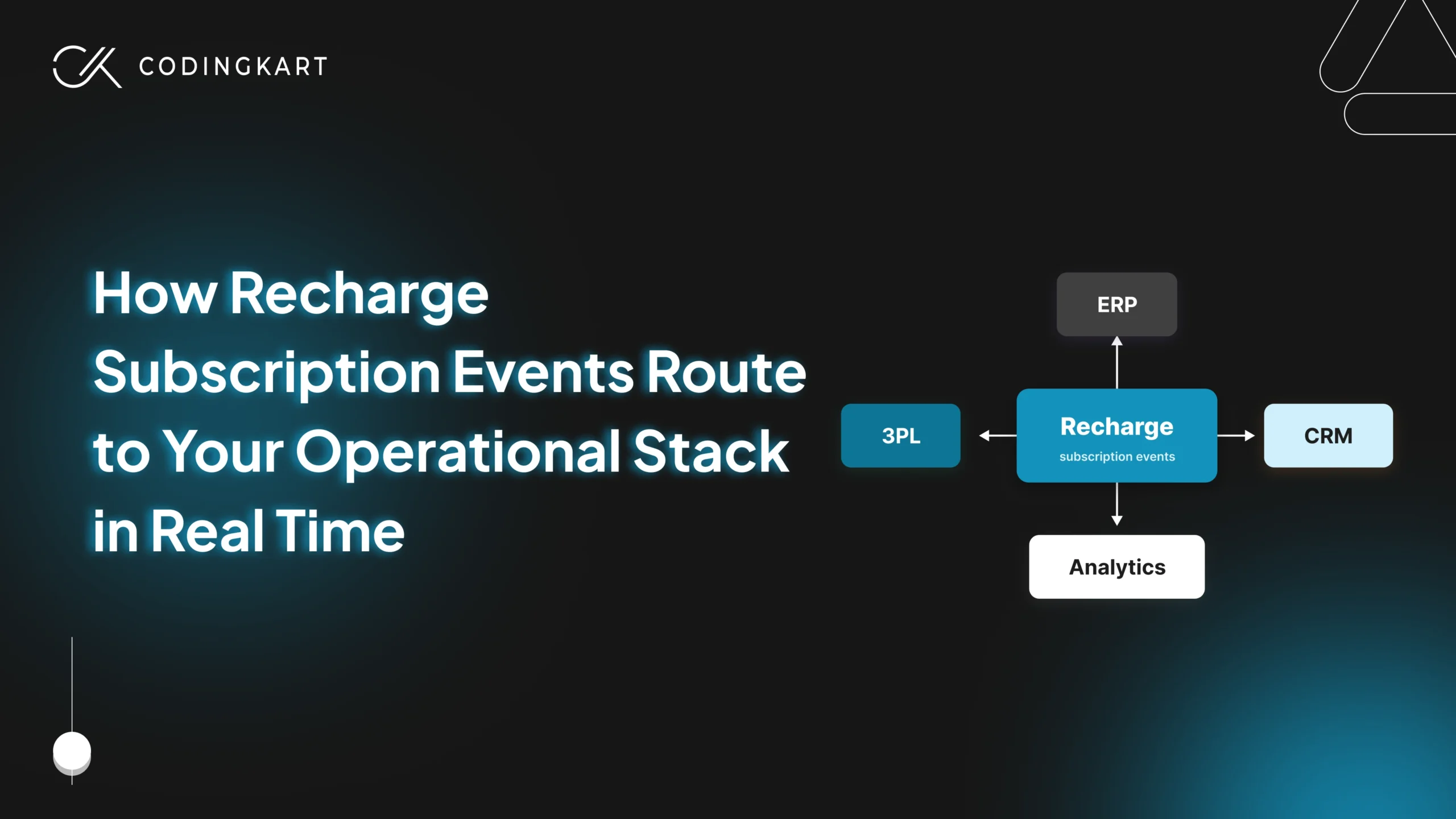
This layer builds the connection between Recharge and your operational stack. Every subscription event that matters gets routed to the right system, with the right data, in real time.
What gets built:
A custom integration layer listens to Recharge webhooks and writes the correct state into each connected system when a subscription event fires. A skip updates the 3PL fulfilment queue, adjusts the ERP demand forecast, and flags the CRM record. A cancellation stops future fulfilment, closes the revenue forecast line, and updates customer segmentation. An address change routes to the 3PL immediately, not on the next manual sync.
The integration handles every event your operations team currently tracks manually. It replaces the Zapier automations, the Google Sheets nobody fully trusts, and the manual reconciliation process that should not exist at this stage of the business.
When Shopify Flow is enough
Before scoping a custom integration layer, it is worth checking whether Shopify Flow already covers what you need.
Shopify Flow supports custom subscription triggers including subscription created and subscription renewed. For brands with straightforward event routing needs, such as sending a fulfilment notification when a renewal processes or updating a customer tag when a subscription is paused, Flow handles this without custom development.
Flow is enough when your event routing is one system, one action, low complexity. It breaks when you need conditional logic across multiple systems, when downstream systems need different data formats, or when a single Recharge event needs to trigger different actions in your 3PL, ERP, and CRM simultaneously.
When you need custom middleware
Custom middleware becomes necessary when the event routing logic is specific to your business in a way no automation tool can handle reliably.
Your 3PL needs a shipment cancellation in a specific data format. Your ERP needs an inventory reforecast with a different set of fields.
Your CRM needs a subscriber status update that depends on whether the skip was subscriber-initiated or system-initiated. Those are three different actions from one Recharge event, each with different data requirements, each writing to a different system.
A custom integration app owns that translation layer. It receives the Recharge webhook, applies your business-specific routing logic, and writes the correct state to each downstream system. It also queues failed writes for retry rather than dropping them silently, which matters when a missed cancellation event means a shipment going to a subscriber who left two weeks ago.
The other reason custom middleware becomes necessary is volume. At high subscription counts, renewal cycles generate a large number of simultaneous webhook events. A Shopify Flow automation hitting a rate limit during peak renewal processing is not a theoretical risk. A custom integration layer built with queue management handles that load without dropping events.
What this layer solves:
Manual reconciliation across ERP, 3PL, and CRM systems. Fulfilment errors caused by systems receiving subscription state changes too late or not at all. Operations teams spending hours each week on data that should already be in sync.
Typical cost: $8,000 to $30,000 Typical timeline: 4 to 8 weeks
Layer 4: Custom Checkout Extensions
Some subscription categories have rules that cannot be fixed after the fact.
A subscription created for an address outside your delivery zone is a fulfilment failure waiting to happen. A subscription created in a state where a specific ingredient is restricted is a compliance exposure. A subscription created without a delivery window selection for a refrigerated product is a spoiled shipment.
Fixing these problems after signup costs more than preventing them at checkout. Cancellations, support tickets, returns, and in regulated categories, potential legal exposure. This layer prevents them at the point they are easiest to prevent, which is before the subscription is created.
Checkout UI Extensions and Shopify Functions are the tools that make this possible. Both require Shopify Plus. This is the one layer in a custom Recharge Shopify integration that is not available on a standard Shopify plan.
What gets built:
Custom validation logic runs inside Shopify Checkout before the subscription is confirmed. The subscriber sees the constraint clearly and can act on it before completing signup. Nothing gets created that should not exist.
Regulated categories: supplements, CBD, and age-restricted products
Supplement and wellness brands operating under state-by-state ingredient restrictions need validation that runs at the point of signup, not after fulfilment has already been attempted.
A checkout extension calls a custom validation endpoint that checks the subscriber’s shipping state against a managed list of restricted ingredients in the cart. If the combination is not serviceable, checkout presents a clear message and prevents submission. The restricted ingredient list lives in a structure the operations team can update without a code deployment.
CBD brands face similar constraints. Regulations vary significantly by state and change with some frequency. A checkout extension that validates against a current, maintained list of serviceable states means the business stays compliant without manual order screening after the fact.
Age-restricted products use the same mechanism differently. An attestation step renders as a required field before checkout completes. The attestation is stored against the customer record and the order, creating an auditable record that the age requirement was disclosed and accepted at the point of subscription creation.
Cold-chain and delivery window validation
Refrigerated and frozen subscription products have a constraint that supplement brands do not. The subscriber has to select a delivery window before checkout completes, and that window has to be real.
A checkout extension renders a delivery window selector as a required field. Available windows are pulled from the fulfilment operation’s capacity in real time. A window that is full does not appear as an option. A subscriber cannot select a slot that cannot be honoured.
For meal kit brands and fresh food subscriptions, this validation is not optional. A missed delivery window means spoilage, a replacement shipment, and a subscriber whose first experience with the brand was a failed delivery. Building the constraint into checkout removes that failure mode entirely.
Zip code and delivery zone validation works the same way. The subscriber’s address is checked against serviceable zones as it is entered. If the address falls outside the delivery area, the subscriber finds out before committing to a subscription, not after.
What this layer solves:
Subscriptions created that should never have been created. Compliance exposure in regulated categories. Fulfilment failures caused by missing delivery window selections or unserviceable addresses.
Typical cost: $6,000 to $25,000 Typical timeline: 3 to 6 weeks
Layer 5: Headless Storefront with Recharge Backend
This is the least common layer and the most expensive. Most Shopify and Shopify Plus merchants building on top of Recharge never need it.
A headless storefront separates the subscription purchase experience from Shopify’s theme layer entirely. The customer-facing storefront is built on Shopify Hydrogen. The Recharge Storefront API handles subscription data. Recharge continues managing billing, payment methods, dunning, and the subscription contract lifecycle in the background.
Every element the subscriber sees is custom built. Product pages, subscription configuration flows, onboarding, account management. Nothing is constrained by what a Liquid template can or cannot do.
What gets built:
A storefront built on Shopify Hydrogen calls the Recharge Storefront API for all subscription reads and writes. The subscriber experience is fully custom from the first product page through to account management. Recharge handles everything underneath.
This architecture is chosen for one of two reasons. Subscription page conversion has become the primary constraint on growth and Liquid templates no longer provide the flexibility needed for testing, personalisation, or performance improvements at scale. Or the subscription product is sold across multiple channels, web, mobile, and potentially third-party platforms, and a single Recharge backend needs to serve all of them.
What this layer does not solve:
A headless storefront built on top of an unstable operational foundation accelerates the wrong things. More subscribers arriving into a portal that frustrates them. More renewals running through a pricing function that fires incorrectly. More fulfilment events routing to systems that disagree.
Layers 1 through 3 should be stable before Layer 5 is scoped. If conversion is the stated problem, it is worth confirming the issue is genuinely the storefront and not subscriber experience or billing reliability first.
What this layer solves:
Conversion rate constraints that Liquid templates cannot address. Multi-channel subscription experiences that need a single billing backend. Subscription purchase flows that require a level of personalisation and performance optimisation that a standard Shopify theme cannot support.
Typical cost: $25,000 to $120,000+ Typical timeline: 8 to 20+ weeks
Custom Recharge Shopify Integration Costs by Layer
These ranges reflect typical project scope for a custom Recharge Shopify integration delivered by an experienced development team. Actual cost depends on what is already running on your store, your Recharge plan, and the complexity of your pricing rules, integrations, and operational workflows.
| Layer | One-time build cost | Typical timeline |
|---|---|---|
| Layer 1 — Custom subscriber portal | $4,000 to $15,000 | 2 to 6 weeks |
| Layer 2 — Custom pricing logic | $5,000 to $20,000 | 2 to 6 weeks |
| Layer 3 — ERP, 3PL, CRM integration | $8,000 to $30,000 | 4 to 8 weeks |
| Layer 4 — Checkout extensions | $6,000 to $25,000 | 3 to 6 weeks |
| Layer 5 — Headless storefront | $25,000 to $120,000+ | 8 to 20+ weeks |
Most Shopify and Shopify Plus merchants build one or two layers, not all five. Brands still weighing the cost difference between extending Recharge and building a fully custom subscription system will find the numbers look very different depending on subscriber count and operational complexity. Layer 3 tends to be the first build for brands dealing with operational complexity across multiple systems. Brands spending several hours each week reconciling subscription data across systems typically recover the build cost within the first quarter after launch.
Layers 1 and 2 show their return through retention. Brands that have not yet defined a subscription strategy on Shopify before scoping custom development often find the build scope changes significantly once the strategy is clear.
Layer 4 returns through compliance confidence and fulfilment accuracy. Layer 5 returns through conversion rate improvements on subscription pages, which are measurable through standard testing once the layer is live.
How a Custom Recharge Shopify Integration Works in Practice
Chi Dog is a veterinary nutrition brand selling personalised dog meal subscriptions on Shopify Plus. The subscription model was built around five diet types, each requiring its own configuration flow, with pricing and quantities that varied by dog weight, meal frequency, and diet combination.
The complexity was real from the start. A subscriber with two dogs on different diets, different weights, and different feeding schedules could not be served by any standard Recharge configuration. The business needed custom development across multiple layers to make the subscription experience work the way veterinary nutrition actually works.
What was built:
A custom subscription wizard was developed for each diet plan, collecting the dog’s name, weight, and meal frequency before the subscription was created. For new customers unsure which diet to choose, a multi-step recommendation wizard gathered breed, weight, activity level, and health conditions and used diet recommendation logic to suggest the right plan. The wizard integrated directly with the Recharge API to pre-fill subscription options based on the recommendation.
The customer dashboard was rebuilt using the Recharge SDK and Affinity Portal. Subscribers could swap diets, adjust meal plans, reactivate subscriptions, reschedule deliveries, and purchase additional plans directly from their account without contacting support.
A goat milk add-on introduced smart bundling logic. Subscribers choosing to add goat milk with every order triggered an automatic subscription update that included it as a recurring item, without creating a separate subscription or requiring manual intervention.
The half-order feature allowed subscribers with remaining food to reduce their next shipment. Pricing and quantity adjusted dynamically based on the selection. No new SKUs were created. A visually distinct product image communicated the half-order clearly to the subscriber.
A custom embedded Shopify app handled diet logic and order processing. When a subscriber purchased a combination diet plan, the app listened to Shopify webhooks, automatically modified the order with the correct ingredient quantities, and tracked fulfilment status in real time. The app was accessible directly from the client’s Shopify dashboard.
Trustpilot and Gorgias integrations rounded out the build, handling review display and live customer support.
The outcome:
Subscribers could find, configure, and manage highly personalised meal plans without support involvement. The recommendation wizard improved confidence in diet selection for first-time buyers. Automated diet logic eliminated manual order handling. The Recharge SDK-powered dashboard gave subscribers full control over their subscriptions, which improved retention.
Custom Recharge Shopify Integration FAQs
Which Recharge plan do I need before starting a custom integration?
The Recharge Pro plan is the practical starting point for most custom work. It unlocks full API access, the Recharge Storefront API, Theme Engine customisation, and the complete webhook event stream. Layers 1, 2, and 3 all depend on these being available. The standard Recharge plan has limited API access and restricts some webhook event types. If you are currently on the standard plan, confirm your API access level with Recharge before scoping any custom development work.
Do I need Shopify Plus for a custom Recharge Shopify integration?
Not for most layers. Layers 1, 2, and 3 work on standard Shopify plans. Layer 4 is the exception. Checkout UI Extensions and Shopify Functions, which are required to enforce validation logic inside Shopify Checkout, are only available on Shopify Plus. If your business needs compliance validation, delivery window enforcement, or age verification at the point of subscription creation, Shopify Plus is a requirement for that layer. Layer 5 can be built on any Shopify plan but is most common on Shopify Plus stores.
Can I build one layer now and add more later?
Yes. Most Shopify and Shopify Plus merchants build one layer first, validate it, and add further layers as the business needs them. Each layer is independent enough to be scoped, built, and launched on its own timeline. One sequencing consideration worth knowing is that Layer 3 tends to create the most stable foundation for everything that follows. A custom portal built on top of an integration layer that keeps all systems in sync performs more reliably than one built before that foundation exists. But the phased approach is not only possible, it is how most projects actually run.
Who owns the custom code after the project is complete?
You do. Any custom code built for your store, whether that is a custom portal, a pricing function, a Shopify app, or a checkout extension, is yours on delivery. That includes the source code, the logic, and the ability to hand it to another developer if your needs change. Before any project starts, confirm this explicitly in the contract. The deliverable should specify full code ownership transferring to you on final payment, with no ongoing dependency on the agency to keep it running.
About the author

Ready to scope your custom Recharge integration?
Tell us which layer your business needs and we will tell you straight what it involves.