
You set up your subscription products, the first renewals went through, and then you hit something the plugin simply won’t do. Maybe it was charging a different price per variation. Maybe it was a failed payment that quietly killed a subscriber you never won back.
That moment is normal. WooCommerce Subscriptions handles the basics well, but most growing stores reach a point where it stops keeping up with the business behind it.
The frustrating part? Nobody tells you where the walls are until you walk straight into one.
A few of these have an easy fix, a setting you overlooked or a plugin that fills the gap. The rest go deeper, and stacking more plugins won’t touch them.
For every limit below, you get the same four things: what the plugin can’t do, why it costs you money, the workaround when one exists, and the moment it stops being worth your time.
If you’ve searched for woocommerce subscriptions problems before, you’ve seen the broad strokes. What you actually need is the specifics: what WooCommerce Subscriptions can’t do, and how to fix each one.
Per-Variation Subscription Pricing You Can’t Actually Set
Here is a setup that sounds simple and isn’t. You sell one product in three sizes, and you want each size billed on its own terms. Small ships monthly at one price, large ships every six weeks at another, and the bulk option bills quarterly.
WooCommerce Subscriptions can’t do that cleanly on its own.
The variable subscription product type lets you attach a price and a billing cycle to each variation, so the easy version works. Where it falls apart is anything past the basics. Real woocommerce subscription per variation pricing, with genuinely different terms behind each option, runs into the plugin’s own architecture.
Setting genuinely different terms per variation isn’t something the plugin does on its own and takes custom work to pull off.
That gap costs you the moment your pricing gets interesting. Tiered plans, regional pricing, founder rates that differ by package, any model where the billing logic changes per variation, all of it stalls here.
There’s a second trap most people miss. When you set a woocommerce subscription at a different price per variation, the front end displays the lowest possible price as the starting point. A shopper sees “from $5” when the option they actually want costs $30. The expectation you set at first glance is wrong, and wrong expectations at checkout cost conversions.
The cheap workaround is to keep your variations simple and accept the display quirk. That holds until your plans stop being simple.
Getting past this means building variation-level logic into the product itself, so each option carries its own terms, pricing, and renewal rules without fighting the display. That isn’t a setting you flip. It’s engineering.
Why Failed Payments Slip Through: Weak Retries & Dunning
Out of the box, a declined renewal gets retried zero times. The retry system ships off by default, so unless someone ticked a box in your settings, every failed charge simply fails.
That alone explains a lot of lost revenue. Plenty of stores discover their woocommerce subscription payment failed not retrying only after a month of quietly losing subscribers nobody chased.
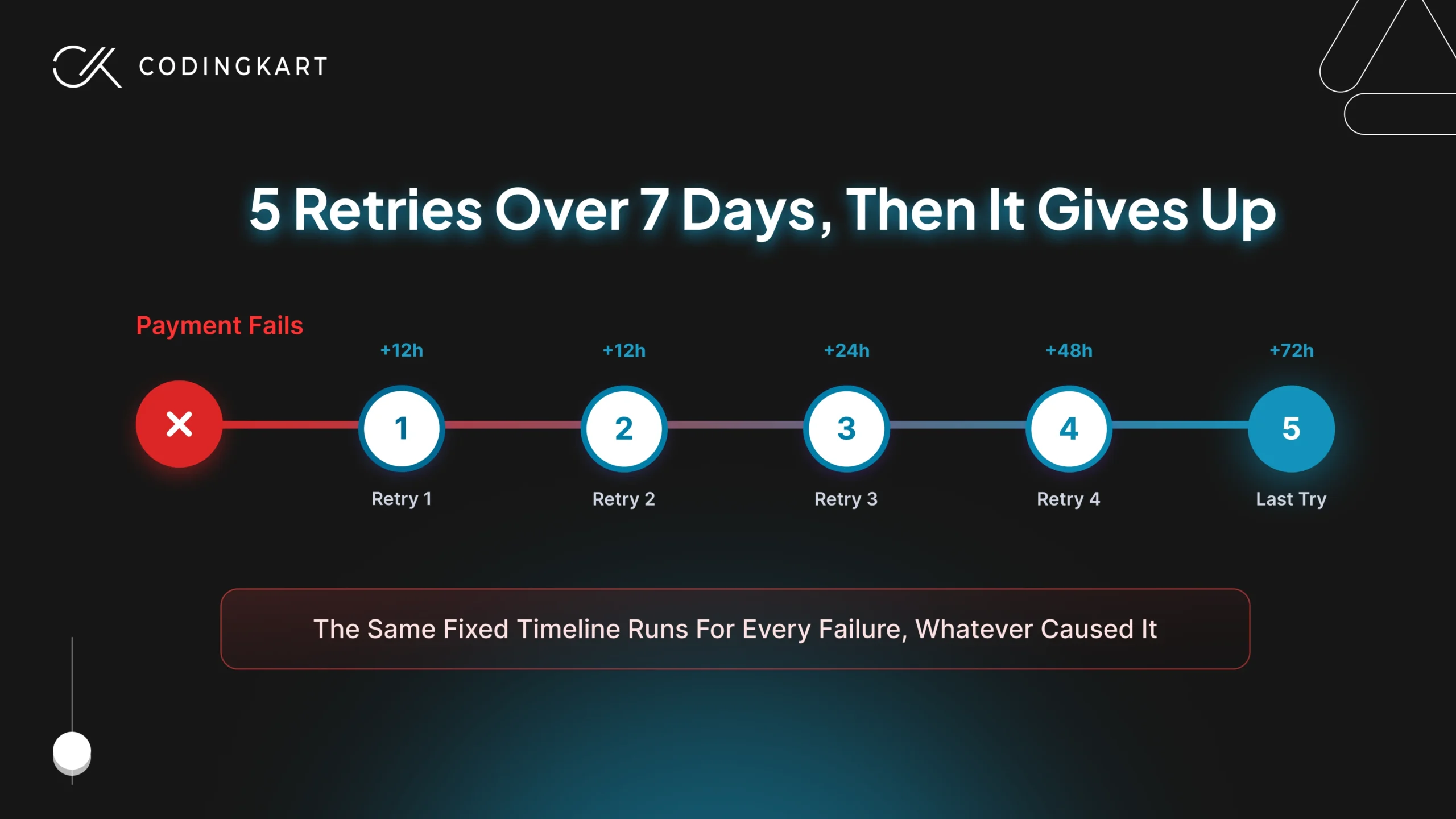
Turn it on and you get more structure than people expect. The system runs five attempts across seven days on a fixed schedule:
- First retry, 12 hours after the failure
- Second retry, 12 hours later
- Third retry, 24 hours after that
- Fourth retry, 48 hours later
- Fifth and final retry, 72 hours later
Here’s the catch. That schedule is identical for every failure, and it never asks why the payment failed. A card that’s maxed out today and a card that was cancelled for good both get retried on exactly the same timeline.
That blindness costs more than wasted attempts. Hammering a hard decline five times can trip fraud flags at the gateway, and Stripe or WooPayments will start treating your store as a risk. You burn goodwill and fees chasing money that was never coming back.
The dunning side is just as thin. What WooCommerce calls dunning is really two email templates, one for the customer and one for you. There’s no escalating sequence, no SMS, no timing around payday, no second message worded differently from the first. You get a notification, not a recovery campaign.
Why does this matter so much? Because this is where involuntary churn lives. These are subscribers who never decided to leave: their card expired, the fixed retry pattern didn’t catch it, and they were gone before anyone noticed. You already paid to acquire them and they already wanted to stay, which makes it the most expensive churn there is.
The workaround is real but limited. A developer can rewrite the retry rules in code and add more email steps, which helps, but it still runs on a fixed schedule blind to the decline reason. You’re tuning a blunt instrument, not sharpening it.
What actually recovers that revenue is engineered payment recovery: retries timed to why the card failed, a dunning flow that escalates across channels, and card-updater logic that refreshes expired cards before they ever decline. None of it ships in the box. It’s the difference between a store that wins back most failed renewals and one that watches them walk.
DTC Brands Can’t Build a Native Build-a-Box
Picture the product page a coffee or pet brand actually wants. A customer picks six items from a range of twenty, sets them to arrive every month, and checks out as one recurring order. Core WooCommerce Subscriptions has no built-in way to do that on its own.
The plugin sells subscriptions to products, and that distinction is the whole problem. On its own it was never designed to let someone assemble their own box from a catalogue and subscribe to the entire thing as a single recurring purchase. That “choose your own” experience, the heart of a woocommerce build a box subscription, isn’t in core.
This gap stings more than the others because build-a-box isn’t a nice-to-have for these brands. It’s the entire model. Pet food, snacks, supplements, and coffee all live or die on letting people choose and mix, so a platform that can’t do it natively pushes you toward selling fixed products on repeat. That’s a far weaker offer, and your customers feel the difference.
You can build it with official add-ons. WooCommerce sells a stack for exactly this: All Products for WooCommerce Subscriptions, combined with Mix and Match Products, lets a customer assemble an assortment and have the whole box converted to a subscription on one schedule. For a straightforward custom subscription box, that stack does the job, and it’s properly supported, not a random bolt-on.
The trouble is what that stack still can’t do, and a few of those limits bite exactly the brands that need build-a-box most:
- One-time or subscribe – the official subscription-box setup doesn’t let you offer the same product as both a one-off purchase and a subscription, so “try it once, then subscribe” is awkward to build
- Per-item box pricing – per-item priced Mix and Match products aren’t fully supported, which is a problem the moment your box price depends on what’s inside it
- Renewals and inventory at scale – keeping a box’s contents, price, and stock correct across every renewal is where these extensions start to strain as volume grows
None of this means the model is a mistake or that the add-ons are bad. It means the supported stack is built for the common case, and the subscription box limitations you hit are structural once your box logic gets specific.
What actually works at that point is moving the box engine into the subscription lifecycle itself, where custom WooCommerce subscription development runs the contents, the price, the stock, and the renewals as one system instead of several extensions each solving a slice.
Switching, Upgrades & Proration That Don’t Quite Work
Expansion revenue is the cheapest growth a subscription business has, and this is where WooCommerce quietly caps it. Letting a customer move up a tier or swap their plan should be frictionless. In practice, it works only as long as the move stays simple.
Native switching does cover the basics. A customer can shift from one subscription variation to another, and the plugin will handle a clean upgrade or downgrade between two straightforward plans. For a lot of stores starting out, that’s enough.
The cracks show the moment real money logic enters. Mid-cycle switches need proration, and the plugin’s handling of it is shallow. When someone upgrades ten days into a monthly plan, working out what they owe for the remaining twenty days, crediting what they already paid, and starting the new rate cleanly is exactly the kind of calculation that starts going wrong.
That’s when you’ll search woocommerce subscription switching not working and find the same answer everywhere: it needs code. The native woocommerce subscription upgrade downgrade flow wasn’t built for tiered structures, hybrid plans, or proration that has to be precise to the day.
The cost isn’t abstract. Every clumsy switch is a customer you couldn’t upsell smoothly, or one who wanted to downgrade instead of cancel and gave up. Both are expansion paths the plugin closes for you.
The version that works is switching and proration logic built around your real plan structure, where the math holds no matter how messy the move. That’s how an upgrade turns into revenue instead of a support ticket.
Subscription Length Is Capped by Your Payment Gateway
Most people assume the subscription rules live in the plugin. A lot of them actually live in your payment gateway, and that’s where unexpected limits come from.
WooCommerce Subscriptions hands a good deal of control to whatever processor takes the money. The gateway can dictate how long a subscription is allowed to run, whether the billing date can move, and which features work at all. So a capability you set up in the plugin can quietly fail because the gateway underneath it won’t allow it.
The old offender is PayPal Standard, now sunset, which is where most woocommerce subscription paypal limitations came from. It couldn’t retry failed payments, couldn’t shift billing dates, and imposed its own subscription length limit regardless of what you intended. Modern processors like Stripe remove a chunk of that pain.
But switching gateways treats the symptom, not the cause. The deeper issue is architectural: the subscription’s behaviour is only ever as flexible as the payment method behind it allows. There’s also the confusing detail where a sign-up fee gets shown to customers as a “trial period,” which means the wording at checkout doesn’t match what they’re actually being charged.
These payment gateway limitations cost you twice, once in features that silently don’t work, and again in customers confused by what they see at billing.
Solving it for good means decoupling your subscription logic from any single processor, so the rules you design hold no matter which gateway moves the money.
Why WooCommerce Subscriptions Slows Down as You Grow
Here’s the cruel part. The better your subscription store does, the worse WooCommerce Subscriptions tends to run. Growth is supposed to be the reward, and instead it becomes the thing that strains the system.
The pressure comes from the engine underneath. Every renewal, every status change, every retry is a scheduled job handled by Action Scheduler, the background queue WooCommerce runs on. It works through those jobs in batches, triggered by cron, a few at a time.
That model is fine with a few hundred subscribers. It buckles when thousands of renewals fall due in the same window. The queue can’t clear fast enough, so you get woocommerce subscriptions renewals not processing on schedule, payments firing hours late, and a backlog that keeps growing while new jobs pile in behind it.
You feel it in four places as you scale:
- Renewals – Due payments sit in the queue and process late, which delays revenue and trips failed-payment edge cases.
- Scheduled actions – The Action Scheduler backlog grows faster than it clears, so jobs stack up instead of running on time.
- Admin – Subscription and order screens slow to a crawl, and bulk actions start timing out.
- Reporting – Reports lag or fail to load as the data they have to crunch balloons.
There are ways to buy breathing room. HPOS (High-Performance Order Storage) moves orders out of the cluttered WordPress posts tables into dedicated ones, which lifts performance, and better hosting with a real cron setup helps the queue move faster.
The trouble is you’re treating symptoms. None of it changes the fact that the architecture underneath was never built for high-volume recurring billing, so every fix just raises the ceiling you’ll eventually hit again.
What clears it for good is a renewal and processing system engineered for your actual volume through custom WooCommerce development, built to push thousands of charges through without the queue ever becoming the bottleneck.
Subscription Reporting Too Thin to Run a Business On
You can’t manage what you can’t measure, and a subscription business lives or dies on a handful of numbers the plugin barely tracks.
WooCommerce gives you order totals and renewal counts. It does not give you the metrics that tell you whether the business is actually healthy.
The gaps are the ones that matter most. The built-in woocommerce subscription analytics leave you without:
- MRR – your monthly recurring revenue, the single number that shows whether you’re growing or shrinking
- Churn rate – how fast you’re losing subscribers, with no native trend view
- LTV – what a subscriber is worth across their whole lifecycle
- Cohort analysis – how groups who joined at different times behave over time
There’s a quieter problem underneath. Even failed-payment events don’t track cleanly, so the data you’d use to understand involuntary churn is incomplete before you start. You’re trying to read a story with pages missing.
Most stores patch this by exporting orders into spreadsheets or piping data into an external analytics tool. It works, sort of. The catch is that it’s manual, it’s slow, and every export introduces room for the numbers to drift from reality.
So you end up making retention and pricing decisions on figures you don’t fully trust, which is a dangerous way to run something built entirely on recurring revenue.
Getting real visibility means a proper analytics layer that calculates MRR, churn, LTV, and cohorts from your live subscription data, so the numbers you steer by are accurate the moment you look at them.
No Guest Checkout, and the Limits No One Mentions
Every extra step at checkout costs you buyers, and WooCommerce Subscriptions adds one you can’t remove. A subscription always requires an account. There’s no guest checkout option, because the plugin needs a customer record to manage renewals against.
The logic makes sense. A recurring charge has to belong to someone the system can bill again next month. But the side effect is real friction, since a first-time buyer who just wanted to subscribe now has to create an account before they can hand you money.
That woocommerce subscription guest checkout gap is mostly unavoidable natively. You can soften it by auto-creating the account quietly in the background so the customer barely notices, which helps, though the requirement itself never goes away.
A few smaller structural limits live here too. Restricting a customer to one subscription per product, or capping how many active subscriptions someone can hold, takes more wrangling than it should for something that sounds basic.
Smoothing any of this comes down to custom checkout and account handling, shaping the signup flow around how you actually want people to buy rather than how the plugin assumes they will.
When Patching WooCommerce Stops Being Worth It
Not every limitation on this list is worth fixing. That’s the part most “go custom” arguments skip, and it’s where an honest decision actually starts.
For a lot of stores, the workarounds are the right call. If you’re early, your plans are simple, and your subscriber count is comfortable, then settings tweaks and the odd add-on will carry you fine. Reaching for custom development too soon is just spending money to solve problems you don’t have yet.
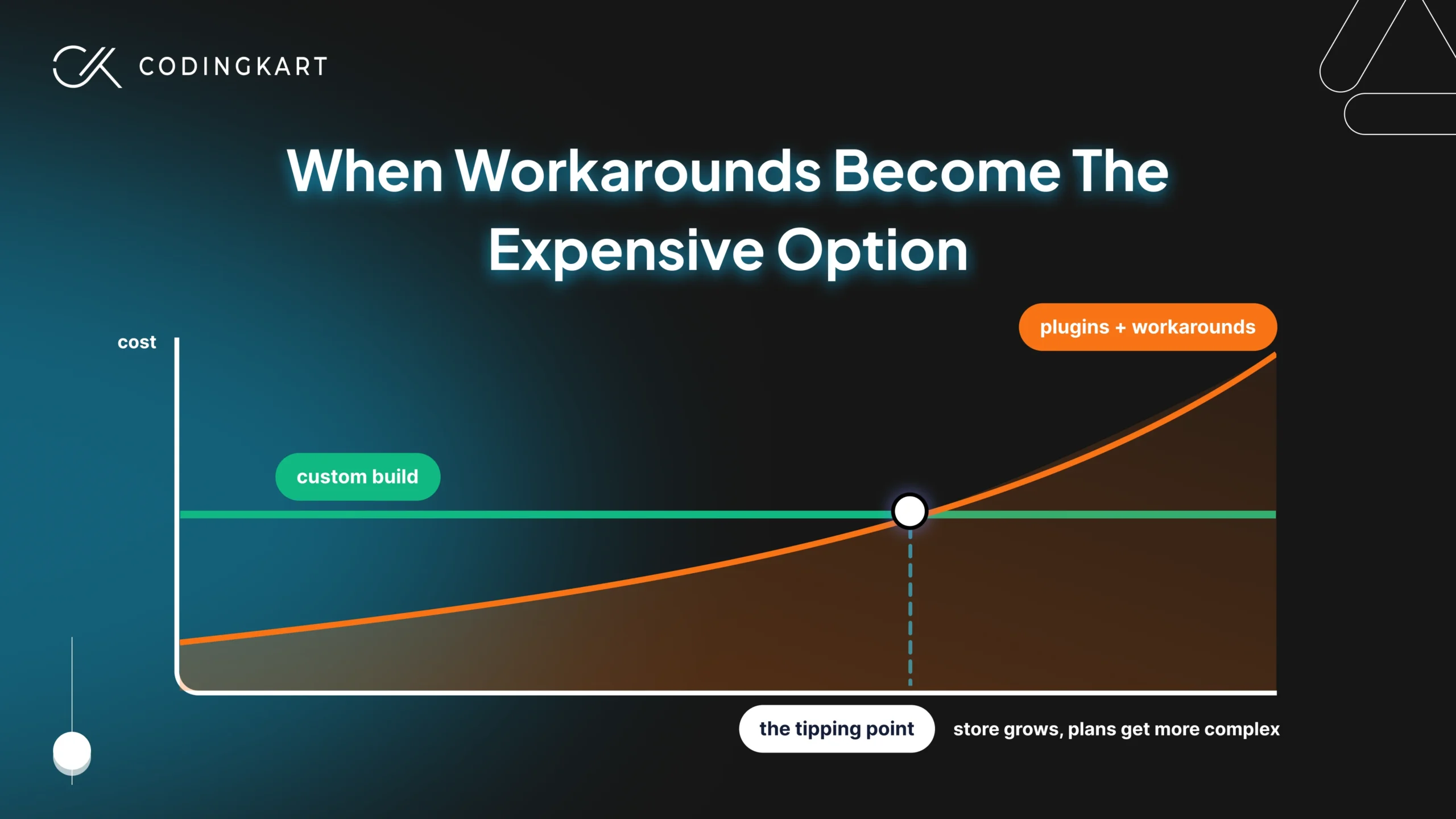
The math changes when the patches start stacking. The real question in woocommerce subscriptions vs custom isn’t which is better in theory, it’s when the plugin quietly becomes more expensive than building would be.
You’ve usually crossed that line when:
- You’re losing real revenue to failed payments the native retry never recovers
- Renewals are processing late because the queue can’t keep up with your volume
- Your model needs build-a-box, per-variation terms, or proration the plugin can’t do natively
- You’re paying for several overlapping plugins that still don’t quite work together
- Your team spends more time fighting the system than serving customers
When three or four of those are true at once, you’re already paying the cost of custom, just in lost revenue, plugin licences, and wasted hours instead of in a build. At that point the workarounds aren’t the cheap option anymore. They’re the expensive ones wearing a cheaper price tag.
A system shaped around how your business actually runs costs less than fighting one that wasn’t, and that’s what a WooCommerce subscription developer builds rather than something you configure your way into.
WooCommerce Subscriptions Limitations: FAQs
Can you set one product variation as a subscription and another as one-time in WooCommerce?
Not natively. When you make a variable product a subscription, the subscription applies to all variations, and there’s no built-in setting to make one variation recurring and another a single purchase. Splitting behaviour at the variation level takes custom development.
Can customers choose to buy a product once or subscribe to it in WooCommerce?
Not with the core Subscriptions plugin alone. WooCommerce Subscriptions sells a product as a subscription, so offering a genuine “buy once or subscribe” choice on the same product needs an additional extension or custom work. Stores that rely on this option usually end up building it.
Can you manually change a subscription’s next payment date in WooCommerce?
Yes, an admin can edit the next payment date from the Edit Subscription screen. The limitation is that the plugin recalculates future renewals from the last payment date, not the date you set, so schedules drift over time unless you keep correcting them.

 Get Started
