
When Germany’s Kündigungsbutton law took effect in July 2022, the Verbraucherzentrale Bundesverband started pursuing non-compliant stores within months. Warning letters went out fast. Merchants who assumed enforcement would be gradual found out otherwise.
June 19, 2026 follows the same pattern. From that date, §356a BGB requires every online store concluding B2C contracts with German consumers to provide a Widerrufsbutton: a digital withdrawal function built around a specific two-step process, with automatic email confirmation, accessible without a customer login.
Subscription stores face a different situation. They need both buttons. The Kündigungsbutton under §312k BGB applies to subscription cancellations. The Widerrufsbutton applies to withdrawal from individual purchases. German law treats these as two separate legal functions and does not permit combining them into one.
Most stores will install a plugin and assume they are compliant. In the majority of cases, they will not be.
The Widerrufsbutton: What §356a BGB Actually Requires
The mistake most stores make is treating this as a UI task. Add a button, link it to a form, done. That is not what the law requires.
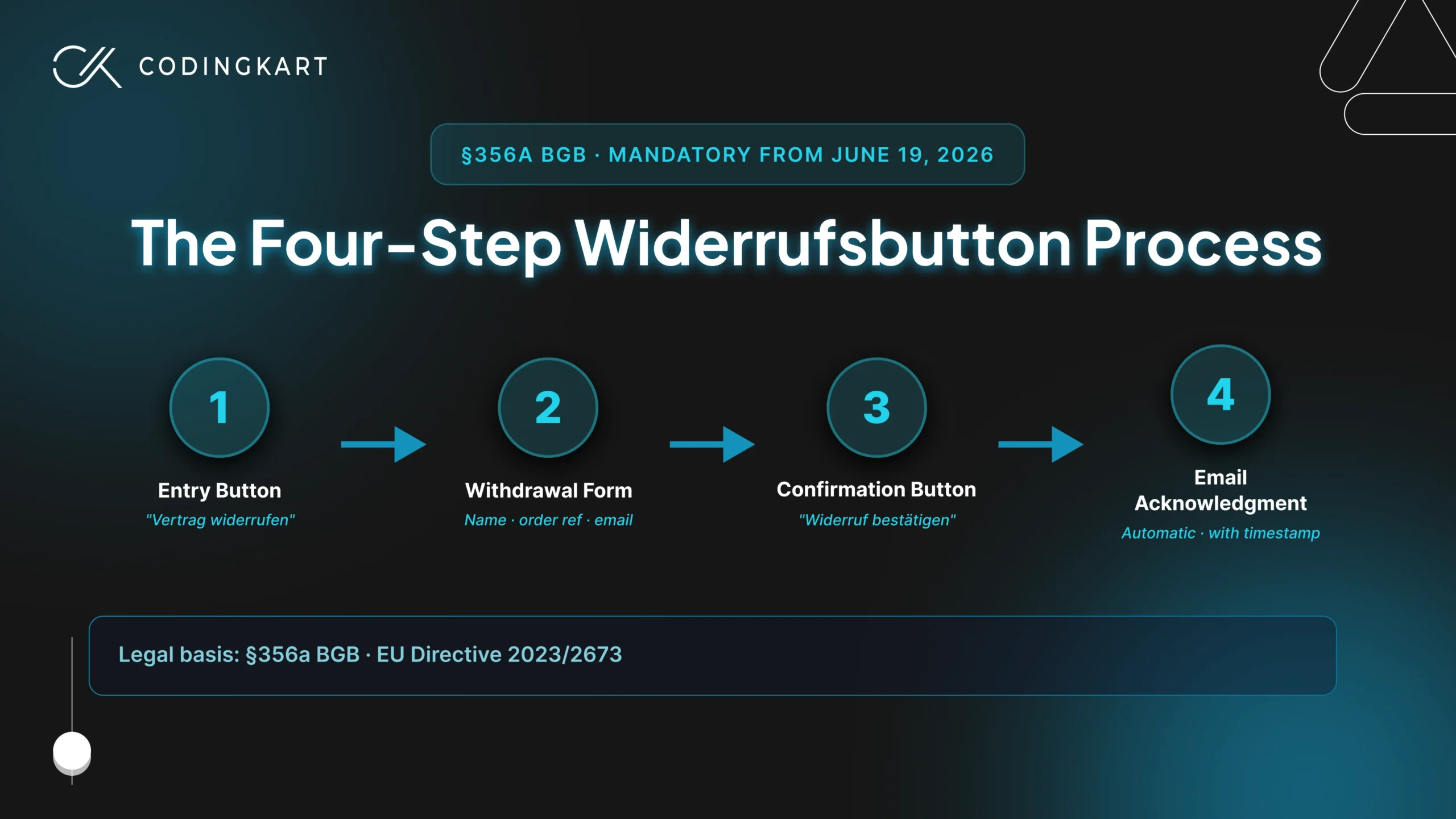
§356a BGB, which came into force as part of Germany’s implementation of EU Directive 2023/2673 and was published in the Federal Law Gazette on February 5, 2026, mandates a four-step withdrawal process. Every step is legally defined. Missing any one of them puts the store in violation.
The Entry Button – A clearly labeled button reading “Vertrag widerrufen” must be permanently visible and accessible throughout the entire 14-day withdrawal period. It cannot be buried in a menu, hidden behind multiple clicks, or locked behind a login. For stores where purchases can be made as a guest, it must work without account creation.
The Withdrawal Form – Clicking the button opens a form that may only collect what is needed to identify the contract: the customer’s name, the order reference, and an email address for the confirmation. Asking for a withdrawal reason or adding any optional fields is a legal violation in itself.
The Confirmation Button – After completing the form, the customer must actively click a second button labeled “Widerruf bestätigen” to submit. One click on the entry button alone is not enough.
The Email Acknowledgment – An email confirmation must go out automatically the moment the customer confirms, with a timestamp included. This record is the legal proof that the withdrawal was received on time.
Non-compliance carries penalties of up to €50,000 or 4% of annual revenue, whichever is higher for larger businesses. There is also a lesser-known consequence: if the button is missing or incorrectly implemented, the withdrawal period for affected customers extends from 14 days to 12 months and 14 days. Beyond regulatory fines, the more immediate risk is the Abmahnung, a formal warning letter that competitors and consumer protection associations send aggressively in the days following a compliance deadline. After the Kündigungsbutton launched in 2022, that wave started within weeks.
The Kündigungsbutton: What Subscription Stores Must Know
This one is not new. §312k BGB has been in force since July 1, 2022, and enforcement started within weeks. The Landgericht Köln issued its first ruling against a non-compliant business in late July 2022, just days after the deadline passed. A vzbv study published in June 2023 found that only 42% of approximately 3,000 subscription websites checked actually met the legal requirements. That means the majority of subscription stores were still non-compliant a full year after the law came into force.
The Kündigungsbutton applies specifically to subscriptions and recurring contracts concluded online: product subscriptions, membership programs, digital services, meal kit deliveries, any arrangement where a consumer pays on a recurring basis. It does not apply to one-off purchases. That distinction matters because Shopify subscription stores and WooCommerce subscription stores are in a different legal position from standard ecommerce stores, they need both this button and the Widerrufsbutton, as two separate functions.
What the law requires is straightforward. A clearly labeled button reading “Verträge hier kündigen” must be permanently accessible on the website, without requiring a login to reach it. Clicking it takes the customer to a confirmation page where they complete the cancellation by clicking a second button labeled “Jetzt Vertrag kündigen.” An email confirmation follows immediately.
There is no grey area on combining the two buttons. Multiple law firms including Noerr have confirmed that a single button serving both the Kündigungsbutton and Widerrufsbutton functions is not legally permitted. They are two separate legal obligations under two separate provisions of the BGB and must remain two separate flows.
Does This Apply to Your Store?
The most common assumption is that this is a German problem for German businesses. It is not. Both §356a BGB and §312k BGB apply to any business, regardless of where it is based, that concludes B2C contracts with German consumers through an online interface. A store based in the US, UK, Australia, or India selling to German customers falls within scope. The deciding factor is where the customer is, not where the business operates from.
The law also covers more than traditional webshops. Websites, mobile apps, and software platforms are all included under the definition of an “online user interface.”
Before assuming your store is affected, here is a straightforward breakdown:
| You need the Widerrufsbutton | You are exempt |
|---|---|
| Any B2C store with German customers | Pure B2B stores with no consumer sales |
| One-off product or service purchases | Custom-made or personalised products |
| Digital products or services | Digital products already downloaded with explicit consent |
| Mobile apps used to conclude contracts | In-store or telephone contracts |
For subscription stores the picture is different, and this applies directly to meal kit brands, health and wellness stores, digital membership platforms, and any brand running a recurring delivery model into the German market.
How to Add the Widerrufsbutton on Shopify
Shopify has not released a native Widerrufsbutton solution. There is no toggle in the admin panel, no built-in flow, and no official Shopify documentation covering §356a BGB compliance. What exists instead are third-party apps and, for more complex setups, custom development.
Standard Shopify Stores
Two apps currently cover the Widerrufsbutton for standard Shopify stores. The Händlerbund, Germany’s largest ecommerce association, released a dedicated Shopify app that activates through the Theme Editor and handles the complete four-step withdrawal flow. Revoq, which carries the Built for Shopify certification, works without touching theme code, supports guest orders without login, and sends the automatic email confirmation with timestamp. Both apps handle the core legal requirements.
Where apps stop working reliably is on heavily customised Shopify themes. A custom theme with a non-standard footer structure, a custom account area, or modified checkout pages may not render the button correctly or in a legally compliant position. The button must be permanently visible throughout the 14-day withdrawal period, which means placement and visibility need to be verified across every key page, not just the homepage.
Beyond the button itself, two things still require manual attention regardless of which app is used. The Widerrufsbelehrung, which is the withdrawal policy page, must be updated to reference the URL of the new withdrawal function. The AGB, the general terms and conditions, also needs updating to reflect §356a BGB. Neither of these is handled automatically by any app.
Shopify Plus Stores
Shopify Plus opens up additional placement options through checkout extensibility. The withdrawal button can be integrated directly into the checkout flow, which is the most visible and accessible placement for Plus merchants. This approach is more compliant in spirit with the law’s requirement that withdrawal be as easy as purchase, since the customer encounters the option at the point of transaction.
The trade-off is complexity. Checkout extensions in Shopify Plus require development work to implement correctly, and any existing checkout customisations need to be reviewed to ensure the withdrawal flow does not conflict with them.
Shopify Subscription Stores
Subscription stores on Shopify need both buttons and this is where standard apps fall short. The Revoq and Händlerbund apps handle the Widerrufsbutton for initial purchases. Neither handles the Kündigungsbutton for the subscription itself. That is a separate flow, a separate legal requirement, and in most cases a separate integration entirely.
Shopify subscription setups built on apps like Recharge, Bold Subscriptions, or native Shopify Subscriptions each have different data structures and account interfaces. The Kündigungsbutton needs to sit within the subscription management area, which means the implementation path varies depending on which subscription system the store runs. A store running a heavily customised subscription setup will almost certainly need development work to get both buttons correctly placed and legally functional.
How to Add the Widerrufsbutton on WooCommerce
WooCommerce has stronger plugin coverage than Shopify for this requirement. Three established options already exist, and unlike Shopify, the ecosystem here had solutions in development well before the deadline. The problem is not finding a plugin. It is getting the plugin to work correctly inside a custom theme.
Standard WooCommerce Stores
Three plugins currently handle the Widerrufsbutton for WooCommerce stores.
The vendidero EU Order Withdrawal Button plugin is free, open source, and verified on WordPress.org. It creates a withdrawal page, handles the complete two-step flow, and sends an automatic email confirmation to both the customer and the merchant. For stores already running Germanized, the withdrawal button functionality is included natively from version 4.0 onwards with no separate plugin required, accessible under WooCommerce > Settings > Germanized > General > Withdrawal Button. German Market by MarketPress announced the button as part of version 3.58, planned for release before the June 19 deadline.
Where plugins run into trouble is placement. The vendidero plugin can automatically embed the button into the footer, but as its own documentation notes, the display may not render correctly depending on the theme. Full-site-editing themes, custom footer structures, and heavily modified WooCommerce themes often require manual placement rather than relying on the automatic embed. Getting the button into the right position, styled consistently with the store, and visible on both desktop and mobile is where the work shifts from plugin configuration to theme-level development.
The most common failure point after placement is email delivery. The confirmation email is a legal requirement, and the most frequent issue is not that it fails to send but that it lands in spam or is filtered by corporate email clients. Testing the full flow with multiple email providers before going live is not optional.
WooCommerce Subscription Stores
WooCommerce subscription stores are in the same position as their Shopify counterparts: two buttons, two separate flows, two separate legal obligations. The Widerrufsbutton covers the initial purchase. The Kündigungsbutton covers the ongoing subscription.
The compliance plugins above handle the Widerrufsbutton. None of them automatically configure a legally compliant Kündigungsbutton for WooCommerce Subscriptions or third-party subscription plugins. The Kündigungsbutton needs to sit within the subscription management area and trigger the correct two-step cancellation flow, which means its placement and behaviour depend entirely on how the subscription system is built. Custom subscription setups or stores using multiple subscription plugins alongside a custom theme will almost always need development work to get both buttons correctly implemented and tested.
Where Most Stores Get It Wrong After Installing the Plugin
Installing an app and going live does not mean a store is compliant. The legal requirements for both buttons are specific enough that partial implementation is still a violation. These are the mistakes that appear most often.
- The Login Wall – The button must be accessible without a customer account login for any store where purchases can be made as a guest. Placing it only inside the customer account area effectively locks out every guest buyer. Multiple court rulings following the Kündigungsbutton launch confirmed that requiring login before accessing the button violates the law.
- Skipping the Two-Step Process – A single button that immediately registers a withdrawal is not compliant. The law requires an entry button, a form, and then a separate confirmation button labeled “Widerruf bestätigen.” Stores that compress this into one step are in violation regardless of how clean the UX looks.
- Email Confirmation Not Arriving – The automatic email confirmation is a legal requirement, not a courtesy notification. The most common failure here is not the email logic itself but delivery: confirmation emails landing in spam folders or being filtered by corporate email clients. If the customer cannot receive and store the confirmation, the legal requirement is not met.
- One Button for Both Laws – Stores that run subscriptions sometimes attempt to serve both the Widerrufsbutton and Kündigungsbutton through a single interface. This is not permitted. §356a BGB and §312k BGB are two separate legal obligations and must function as two separate flows.
- Wrong Button Label – The entry button must read “Vertrag widerrufen” or an equivalent formulation that unambiguously communicates withdrawal. Labels like “Return request,” “Cancel order,” or “Contact us” do not meet the legal standard and have been the basis for Abmahnung letters following the Kündigungsbutton enforcement.
- AGB Not Updated – The general terms and conditions must be updated to reference §356a BGB and the withdrawal function. Failing to do so is a separate legal violation, independent of whether the button itself works correctly.
- Widerrufsbelehrung Not Updated – The withdrawal policy page must reference the URL of the new withdrawal function. If this update is missing, the 14-day withdrawal period does not apply. The customer retains the right to withdraw for 12 months and 14 days instead.
- Button Only Visible on the Account Page – The button must remain accessible throughout the entire 14-day withdrawal period from any point in the store, not just from the customer account dashboard. A button that disappears after the initial purchase page or that requires navigating to a specific area of the account does not meet the permanent visibility requirement.
Compliance Checklist: Before You Go Live
Before setting either button live, work through this checklist. Every point is a confirmed enforcement trigger from either court rulings or the legal requirements of §356a BGB and §312k BGB.
- Widerrufsbutton is visible and accessible on all pages without requiring a login
- The withdrawal flow runs as two steps: entry button, form, then a separate confirmation button
- Email confirmation sends automatically the moment the customer submits the form
- Confirmation email tested across multiple inboxes and confirmed not landing in spam
- Button works for guest orders without account creation
- Withdrawal form asks only for name, order reference, and email – no reason field, no free text
- Kündigungsbutton is a separate button with its own separate flow for subscription stores
- AGB updated to reference §356a BGB and the withdrawal function
- Widerrufsbelehrung updated to include the URL of the withdrawal function
- Full flow tested on mobile as well as desktop
- Datenschutzerklärung updated to cover the data collected through the withdrawal form
If You Have Already Missed the June 19 Deadline
Based on how enforcement played out after the Kündigungsbutton deadline in 2022, the first Abmahnung letters typically arrive within days of a deadline passing. An Abmahnung is a formal cease and desist warning, usually sent by a competitor or a consumer protection association like the Verbraucherzentrale Bundesverband. It is serious, but it is not the end.
The worst response is to ignore it. Every Abmahnung includes a response deadline, typically one to two weeks. Missing that deadline escalates the situation significantly and can result in an interim injunction.
The right response is to get compliant as fast as possible and respond within the stated timeframe. Stores that implement the button quickly after receiving a warning are in a materially better legal position than those that do not act at all. Late implementation is always better than no implementation.

 Get Started
